|
Sudoku Puzzles
Introduction
Solving Puzzles
Back to Wiki Home
edit this SideBar
|
Sudoku Advanced Terminology
Annotating the Puzzle
- A Candidate (previously Possible) is a Number that could still turn out to be the Solution of a Cell. Consider any Cell. It is a member of three Groups (a Row, a Column and a Box). Some Cells in those Groups will have a Number Entered into them, either as a Given or as the Solution to that Cell. By the Rules of Sudoku, none of those Numbers can be the Solution to our Cell. The Candidates of our Cell are the Numbers 1 to 9 after the removal of the Numbers in other Cells that share a Group, perhaps followed by the application of advanced solution strategies. The idea of Candidates becomes important in the discussion of these solution strategies, which don't actually find the Solution to a Cell, but rather narrow down what can go where so that a more basic strategy can home in on a Solution. In retrospect, I wish I'd come up with the word Candidate for this, but it's too late now.
- We Eliminate a Candidate from a Cell when we determine that it cannot, in fact, be the Solution to that Cell. For example, when a Cell is Solved, the Number Entered as the Solution is Eliminated from all other Cells in the three Groups of which that Cell is a member. Some of those Cells may not have that Number as a Candidate because it has already been Eliminated via some other route. I don't lose sleep over this, so I use the word to mean "make sure that the Number is no longer a Candidate" rather than "take a Candidate and get rid of it".
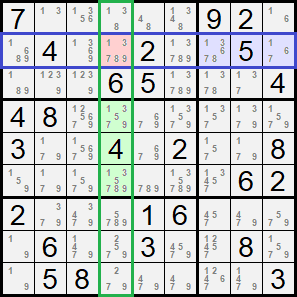
- I use the word Annotate to mean visibly recording any information about the progress of the Solution to a Puzzle other than Entering Numbers into individual Cells. Usually, people write in tiny numbers on the printed puzzle, in the Cells or the margins. My computer program can, if instructed to so so, show the Candidates of each Cell in small, grey digits. The Puzzle † shown at right has been Annotated in this way. Although not exactly relevant at this time, I might as well point out that these little numbers allow you to Enter (left-click) or Eliminate (right-click) Numbers in the Cells to work manually on the Puzzle.
When Groups Collide
- For every Row and every Column, there is one Cell that they both contain (of course it will be a different Cell in every case). This is termed the Intersection. It is not terribly interesting, nothing special goes on there, but if the term crops up, you'll know what I mean by it. The example Puzzle shown here, above-right, has the Intersection of the second Row and the fourth Column called out with a red background.
- For every Box, there are three Rows with each of which it shares three Cells (again, different in each case). The Box shares no Cells with the other six Rows. The same is true of Boxes and Columns. The three Cells shared by a Box and either a Row or a Column is termed an Overlap. Unlike Intersections, Overlaps are important and will be used in the description of advanced solution strategies. The example Puzzle has the Overlap of the second Row and the top-right Box called out with a blue background and the Overlap of the fourth Column and the middle Box called out with green.
- To avoid writing "either a Row or a Column" over and over again, a Group that isn't a Box, that is to say ... well ... it's either a Row or a Column, isn't it, will be termed a nonBox. If anyone out there has a better idea (I can't think of anything worse), please send it to me telepathically.
† The puzzle used as an example appeared in the Boston Globe newspaper on Thursday, November 10th, 2022. It is rated by the Globe as “more difficult”.
|