
|
Introduction Solving Puzzles |
Sudoku /
Sudoku Strategy ZeroDescriptionIn Strategy Zero, we look for an unKnown Cell that has only one possible Solution because the other eight Numbers are already present in the Groups of which the Cell is a member. Every Cell is a member of one Row, one Column and one Box. We go though the Known Cells of these three Groups and gather up a list of the Numbers in them (not differentiating Givens and Solutions). We then take the Numbers 1 to 9, Eliminate everything in our list and what's left are the Possibles of the unKnown Cell we are examining. If there’s more than one, we cannot Solve this Cell using Strategy Zero at this time and we move on. If there is only one Possible (eight Numbers were Eliminated), then it is the Solution to the Cell and it can be written in. (If there are no Possibles left, the puzzle is broken.) As with Groups and Numbers in Strategy One, going through all the unKnown Cells in turn does not sound like much fun. Again, you’ll want to try to scan the puzzle for Cells that have the best chance of yielding a Solution. This is not easy to do. You can look for Cells that are in Groups with many Known Cells to increase your chances of picking up eight different Numbers to Eliminate. But it often seems that Puzzles are designed to frustrate you in this by having the same Numbers appear in the Groups. You can also try to focus on Cells that are members of Groups containing the Numbers that are poorly represented in the Puzzle as these will typically be the hold-outs. However, Strategy Zero is more like work and less like fun than Strategy One. I have found that “Easy” Puzzles and many rated “Medium” avoid the need for Strategy Zero. Puzzles sometimes seem to be rated “Hard” only because they require the use of Strategy Zero repeatedly at several points in the Solution and/or early, when there are a large number of unKnown Cells to plough through. 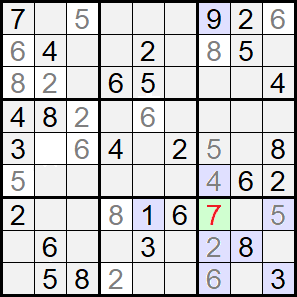 ExampleStrategy One allowed us to Solve seventeen Cells in the Puzzle shown at right†, but at that point we became stuck. Consider Cell 61 (called out with a green background). Numbers 2, 3, 5, 6 and 8 are already present in its Box (blue background). The Cell is also in the seventh Row, which contains 1, and the seventh Column, which contains 4 and 9. 7 is the only Number not already present in the Groups of which Cell 61 is a member. Therefore, it must be the Solution to that Cell and we can write it in. That was easy enough. But, how did we come to Cell 61 in the first place? There are five Known Cells in its Row, six in its Column and two more in its Box (that we didn’t count in either the Row or the Column). That’s a total of thirteen Known Cells in which we hope to find eight different Numbers. Contrast this with Cell 33 (top-right in the middle Box). With four Knowns in its Row, two in its Column and just one more in its Box we have only seven places to look for eight Numbers and can give up before we get started. We might also have noted that, in this Puzzle, three Numbers, 1, 7 and 9, presently appear only once. To have any hope of Eliminating all Numbers except one, we absolutely must include at least two of these in the Groups of our candidate Cell. In this case, we have a 1 in the Row and a 9 in the Column. As we don’t have a 7, if we Solve the Cell, 7 must be that Solution. This tactic does not always work, though. Cell 5 (middle of the top Row) has eleven Known Cells in its Groups and all three of 1, 7 and 9 are represented, so we might reasonably expect to Solve this Cell. But, it turns out that both 4 and 8 are missing and we are disappointed. As the Solution progresses and more Cells become Known, the likelihood of finding Cells with all-but-one of the Numbers elsewhere in their Groups increases. Strategy Zero becomes easier and more enjoyable. Indeed, at the very end we are using it to quickly fill in the last Cell of each Group. But when it’s needed early on and we have a lot of unKnown Cells to sift through it can be tedious. Strategy Zero cannot be used successfully again at this point. The remainder of this Puzzle can be solved using Strategy One alone. Opportunities to use Strategy Zero will come up from time to time but it is only necessary to use it this one time. The Computer ProgramTO DO - write this section. The Original (Obsolete) Computer ProgramThe implementation of Strategy Zero in the computer program is very, very simple. As with Strategy One, no attempt is made to figure out which Cells are most likely to yield a Solution. Instead, we just make our way through them all, in order, left-to-right, top-to-bottom. If the Cell is Known (Given or Solved), we skip over it to the next one. For each unKnown Cell, we just look at its Possibles, i.e. the list of Numbers that are possible Solutions to the Cell. If there is only one Possible (one item in the list), then that is the Solution and we Enter it into the Cell. Otherwise, we move on. That’s it. If you’re wondering where the Possibles information comes from, then you need to go back and read about the computer program for Strategy One. In brief, every Cell starts out with all Numbers in its Possibles and as Numbers are Entered into Cells as Givens or Solutions they are Eliminated from the Possibles of other Cells in the same Row, Column and Box. This happens behind-the-scenes. Now things start to get a bit weird. The program has a setting that enables Strategy Zero to execute “automatically”. We’ve established that when a Number is Entered into a Cell, there is a side-effect that the Possibles of all Cells sharing a Group with that Cell get updated. Specifically, the Number that was Entered is Eliminated from their Possibles. This may result in only one Possible remaining. Normally, nothing happens as a result of this, but if Strategy Zero is set to automatic then the last remaining Possible is Entered into the Cell as the Solution. Which, of course, it is, so, hooray! Not weird enough for you? We started innocently enough by Entering a Number in a Cell. As a result, the Possibles of a bunch of other Cells got updated. One or more of them could end up with only a single Possible. So, that would get Entered in its Cell. What happens now? More Cells would get their Possibles updated. Potentially, more would get Solved. Inadvertently, I was running Strategy Zero automatically and recursively. This all got implemented because it was easy, so why not? This is a bad reason for doing anything. I should know that recursion is more often than not a bad idea in itself. As I’ve built up the program I’ve had several problems because of this but I’ve not got around to fixing it yet. † The puzzle used as an example appeared in the Boston Globe newspaper on Thursday, November 10th, 2022. It is rated by the Globe as “more difficult”.
|