
|
Introduction TS-233 Basic Setup
Advanced Setup |
Selecting a New Network Attached Storage Device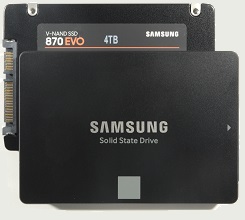 Selection of the DrivesI did not spend long selecting drives for the new NAS. I knew what I wanted and just had to check the details to avoid a mistake. SSDs (not hard drives) were a no-brainer for low power consumption, almost instant wake-up and good performance in general. The old NAS had never accumulated more than 300 GB, so I felt that 1 TB would be enough for the new one. That sounds short-sighted, but I expected to be able to move most of what used to be on the RAID array to external drives plugged in to USB ports that would still appear as network storage. I checked prices at newegg and confirmed that 1 TB SSDs sat at a good price point, with lower capacities not offering much cost saving and larger being more than twice as expensive. I have a strong preference for Samsung SSDs, with Western Digital also in the running. I can’t justify this, except to say that, judging by reviews, I am not alone. Western DigitalWD storage solutions are cleverly divided into colors according to the intended application. Green is “light computing”, blue is “creators”, black is “gaming”, red is “NAS”, purple is “video recording” and gold is “enterprise”. Ideally, then, I would buy red, but a red 1 TB drive was $105.18 as compared to blue starting at $59.99. A feature compare revealed no obvious advantage of Red; the lower cost Blue (WDS100T3B0A) seemed just as good. The NAS is only for domestic use. If I pay the lower price, I’ll feel better about replacing the drives with larger ones in five years or so. I made sure to look up the endurance, which is 400 terabytes written (TBW). I could find no mention of RAM cache memory. A side note on SED. SED ≡ Self-encrypting drive. This is a form of hardware-based full disk encryption. The Samsung EVO 870 supports SED according to the OPAL standard. WD drives do not. The TS-233 works with OPAL SED drives. I don’t need this feature. SamsungDecoding the model names was more difficult than the WD colors. I didn’t figure out what the numbers (840, 850, 860, 870 etc.) mean, but I discovered that “QVO” uses QLC NAND (4 bits per cell); “EVO” uses TLC NAND (3 bits per cell) and “Pro” uses MLC NAND (2 bits per cell). I really don’t need Pro, just like I don't need WD red. The newegg compare favored the 870 EVO (MZ-77E1T0B/AM) over the 870 QVO on cost ($69.99) and endurance (600 TBW compared to 360 for the QVO). Both include a 1 GB SDRAM cache. Making the ChoiceComparing the two, the Samsung has 1 GB cache to WD’s none and 600 TBW endurance to WD’s 400. This seems worth the extra $10.00. The Samsung MZ-77E1T0 turns out to be in the QNAP “Recommended SSD for TS-233” list with nine likes (the only WDs on this list are Reds and have fewer likes). I found a review of the 870 EVO series that is generally favorable. The Samsung seems to be the hands-down winner. 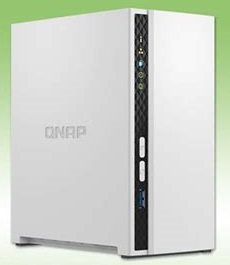 Selection of the NASWhen I sat down to choose a new NAS device, I had no idea how long the whole project of replacing Natasha would take. Thinking back to 2008, I have no recollection of setting up the DNS-321 being at all difficult. The steps were clear and there was no page-flipping or head-scratching involved. So, I wanted to get the selection process over with so that I could order the parts, put it all together in an afternoon and be up-and running in a week. I wish now that I’d done more research on the intelligibility of user documentation, which may have caused me not to end up with a QNAP product. Anyway, this is what I did. I started by poking around on the newegg Web site just to see how many vendors were offering the product and what range of price I could expect. The list of best selling, two-bay, diskless, desktop NAS devices was dominated by Synology with QNAP, Asustor, TerraMaster and Buffalo lower down. Prices ranged from $159.99 to $776.42. Sorting by price revealed fifteen below $300. Then, I entered the search phrase “desktop nas reviews” into Duck Duck Go. I recognized the sources of the first four reviews listed (PCMag, Tom’s Hardware, the New York Times and ZDNET). I’ve been happy with PCMag reviews, so I picked that one. The title, The Best NAS (Network Attached Storage) Devices for 2022, was very encouraging. Eleven devices were listed. I eliminated those over $300.00 to leave five. Here are my notes from the reviews (and, sometimes, other sources, such as the product documentation). The prices were from newegg. Asustor AS1102T Drivestor 2 (Best Budget NAS Device for Most Users, $179.00)RTD1296 4-Core CPU at 1.4 GHz, 1 GB DDR4, 2.5-Gigabit Ethernet, 2 x 3.5” bays, 2 x USB 3.0 ports (1 front, 1 rear) support external storage, etc. 3-year warranty. This is PCMag’s top pick. The basic specifications (above) look fine and I like the 3-year warranty. However, there is no mention of using 2.5” drives or SSDs, even in the Quick Installation Guide, which shows only the installation of 3.5” hard drives. If I’d done some research, maybe I would have found a convenient adapter, but I didn’t do this. After finding the ‘USB One Touch Copy Button’ on the TS-233, below, I came back to this option to look for something similar. In the Data Sheet, I found ‘One Touch backup’ listed under ‘Backup Solutions’ in the ‘Software & Features’. However, there is no button on this model. It appears that the ‘Software & Features’ page is just boilerplate. I lost a little confidence in asustor on discovering this. QNAP TS-233 (A Solid Alternative to the AS1102T, $199.99)ARM 4-core Cortex-A55 CPU at 2.0 GHz, 2 GB DDR4, 10/100/1000M Ethernet, 2 bays, 3.5” and 2.5”, 1 x USB 3.0 (front) + 2 x USB 2.0 (rear). Power 10.81 W access / 3.43 W idle. 2-year warranty. USB One Touch Copy Button. PCMag’s second pick has the best CPU and memory specifications of the five that I’m considering. I don’t need 2.5-Gigabit Ethernet. The rear USB ports are USB 2.0, which has a gross data rate of 480 Mbit/s (60 MB/s) as opposed to 5 Gbit/s (625 MB/s) for USB 3.0 (now known as USB 3.2 Gen 1). I don’t know how external drives connected here will perform. It could be several GB per minute, which would be OK. QNAP provide an excellent drive compatibility list with many 2.5” SSDs, including the Samsung EVO 870. I read elsewhere that WebDAV may allow me to use ownCloud and also that this NAS is “silent” during operation. But what I really like about this NAS is the front USB port and “One Touch Copy” button. Synology DiskStation DS220j (Best Budget Two-Bay NAS Device for Personal Cloud Setups, $149.52)Realtek RTD1296 4-core CPU at 1.4 GHz, 512 MB DDR4, 10/100/1000M Ethernet, 2 bays, 3.5" / 2.5” (with optional 2.5" Disk Holder), 2 x USB 3.0, both at rear. Power 5.06 W idle. Two USB 3.0 ports is nice, but they’re both at the rear and there’s no copy button. This NAS has the smallest amount of RAM of those reviewed, although I confess I don’t know what that means. There is a very short list of compatible SSDs, but it includes the Samsung 850 EVO 1 TB, MZ-75E1T0 (but not 870 EVO). A YouTube video, Synology NAS - Before You Buy, describes this product as “Apple-like”. The adapter for 2.5” drives seems to be out of stock everywhere and would add to the cost if I could find it. On eBay, there are two at $45.08 each +$37.56 shipping from Germany. That pretty much rules out this NAS for me, so the list is down to four. (Looking around, I find that the Synology DS220+ is superior, with a copy button, but is $285.88.) QNAP TS-230 (Most Stylish NAS for Home Use, $250.84)RTD1296 ARM Cortex-A53 4-Core CPU at 1.4 GHz, 2 GB DDR4, 10/100/1000M Ethernet, 2 bays, 2 x USB 3.0 (1 front, 1 rear) + 1 x USB 2.0 (Rear). Power 12.27 W access / 4.48 W idle. 2-year warranty. I found this at newegg to get the price, but when I looked again a few days later it was gone and has not come back. I found it listed on Amazon at $229.99. Now its price ranges from $169.46 (Amazon) to $279.99 (Box Unboxed). I quickly suspected that it had been replaced by TS-233 and this article confirmed it. The differences are small - the color, a better CPU and the downgrade of one of the rear USB ports. I struck this option from the list, three remain. Asustor AS3302T Drivestor 2 Pro (Best Media Server NAS Device, $249.00)RTD1296 4-Core CPU at 1.4 GHz, 2 GB DDR4, 2.5-Gigabit Ethernet, 2 x 2.5” / 3.5” bays, 3 x USB 3.0 (1 front, 2 rear), 3-year warranty. Power 12.3 W access / 6.04 W idle. This device is a bit bigger and heavier than the AS1102T at the top of the list and costs $70 more. I’m not interested in the media server functionality or the faster Ethernet port, but I like the 2 GB of memory and three SuperSpeed USB ports. This is, however, not worth the extra money. I found the drive compatibility information on the asustor Web site hard to use and understand and that put the last nail in the coffin of this choice. Two left. Making the ChoiceIn the end, the PCMag review didn’t give me many choices in the sub-$300 price range that met my requirements. The TS-230 had been replaced by the TS-233, which was higher up the list. The DS220j and AS1102T don’t work with 2.5” disks. Asustor products suffered from cryptic drive compatibility information. There really wasn’t a choice; the QNAP TS-233 had to be the one. I gave myself a couple of days before ordering to do some more research, but I didn’t find any reason to change my mind. In fact, I found further justification for my choice. For example, Synology listed only their own brand of SSDs as compatible with their low-end NAS systems. Placing the OrderSo I ordered, from newegg, the following :
I bought the extra drive as a spare, so that if one of the other two (in the RAID 1 array) failed, I would already have a replacement on hand. I bought the switch because the 5-port switch I was running the NAS from was maxed out with the old NAS, two printers, a cabled computer and the link back to the router. And, How Do I Feel About My Choice Now?Don’t ask.
|